Physics queries let gameplay ask the world a question right now.
This is the right tool when you need things like:
- line of sight
- ground probes
- target selection
- interaction ranges
- explosion areas
- predictive movement checks
Unlike callbacks, queries happen when your code asks for them. Unlike contact queries, they are not limited to what you are already touching.
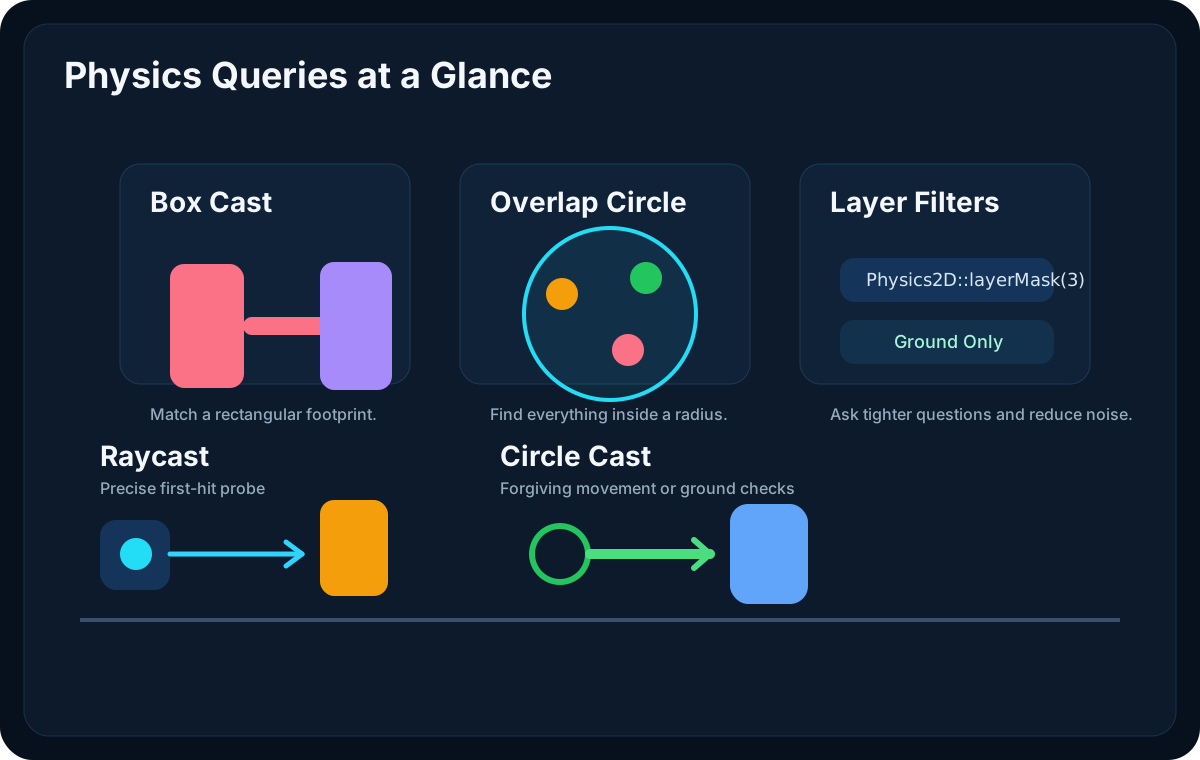
Quick Reference
Lenga exposes these 2D query families:
raycast(...)raycastAll(...)circleCast(...)circleCastAll(...)boxCast(...)boxCastAll(...)overlapPoint(...)overlapCircleAll(...)overlapBoxAll(...)
All of them support:
- trigger filtering
- optional layer masks
A Note on 2D Coordinates
The PHP API uses Vector3 for 2D physics queries.
In 2D gameplay, the z value is typically 0.0.
use Lenga\Engine\Core\Vector3;

$origin = new Vector3(0.0, 0.0, 0.0);
$direction = new Vector3(1.0, 0.0, 0.0);
Use raycast(...) for Thin, Precise Probes
Raycasts are the best starting point when you want "first thing in this direction."
Great fits:
- wall checks
- downward ground probes
- weapon traces
- enemy line of sight
use Lenga\Engine\Core\Physics2D;
use Lenga\Engine\Core\Vector3;

$origin = $gameObject->transform->position;
$direction = new Vector3(0.0, -1.0, 0.0);

$hit = Physics2D::raycast($origin, $direction, 1.5, false);

if ($hit !== null) {
    Debug::info('Hit ' . ($hit->gameObject?->name ?? 'Unknown'));
}
Use raycastAll(...) When You Need Every Hit
Sometimes the first hit is not enough.
Examples:
- bullet penetration
- visibility tools
- editor picking tools
- finding everything between two points
$hits = Physics2D::raycastAll($origin, $direction, 10.0, true);

foreach ($hits as $hit) {
    Debug::info('Along ray: ' . ($hit->gameObject?->name ?? 'Unknown'));
}
Use circleCast(...) for Forgiving Movement Checks
Circle casts are often better than rays when you want some thickness.
They are especially good for:
- rounded characters
- forgiving ground checks
- rolling projectiles
- "would this movement hit anything?" checks
$groundHit = Physics2D::circleCast(
    $gameObject->transform->position,
    0.35,
    new Vector3(0.0, -1.0, 0.0),
    0.8,
    false
);

if ($groundHit !== null) {
    // We found support below the body.
}
Use boxCast(...) When Your Gameplay Shape Is Rectangular
Box casts are a strong fit for:
- platformer body movement
- melee hit volumes
- push boxes
- rectangular sensors
$hit = Physics2D::boxCast(
    $gameObject->transform->position,
    new Vector3(1.0, 2.0, 0.0),
    new Vector3(1.0, 0.0, 0.0),
    2.0,
    false
);
If your character footprint is box-like, a box cast often matches gameplay better than a ray or circle.
Use overlapPoint(...) for Picking
This is ideal for:
- clicking world objects
- checking if a spawn point is occupied
- testing a cursor against colliders
$collider = Physics2D::overlapPoint($worldMousePosition, true);

if ($collider !== null) {
    Debug::info('Selected collider on ' . $collider->gameObject->name);
}
Use overlapCircleAll(...) for Radius Checks
This is often the cleanest way to build:
- explosions
- magnetic pickups
- enemy awareness radii
- interaction prompts
$targets = Physics2D::overlapCircleAll(
    $gameObject->transform->position,
    3.0,
    true
);

foreach ($targets as $target) {
    Debug::info('In radius: ' . $target->gameObject->name);
}
Use overlapBoxAll(...) for Area Checks With Hard Edges
Good fits:
- room sensors
- rectangle hit zones
- placement tests
- puzzle rule areas
$colliders = Physics2D::overlapBoxAll(
    $gameObject->transform->position,
    new Vector3(4.0, 2.0, 0.0),
    false
);
Layer Masks Keep Queries Focused
Use Physics2D::layerMask(...) when a query should only care about certain layers.
use Lenga\Engine\Core\Physics2D;

$groundMask = Physics2D::layerMask(3);
$enemyMask = Physics2D::layerMask(2);

$groundHit = Physics2D::raycast($origin, $down, 1.0, false, $groundMask);
$enemyHits = Physics2D::overlapCircleAll($origin, 4.0, true, $enemyMask);
This is one of the easiest ways to stop a query from becoming noisy.
Trigger Filtering
All of these queries can include or exclude triggers.
Use true when trigger zones matter to the query.
Use false when you only want solid geometry.
$solidHit = Physics2D::raycast($origin, $direction, 5.0, false);
$triggerAwareHit = Physics2D::raycast($origin, $direction, 5.0, true);
What a RaycastHit2D Gives You
Cast queries return RaycastHit2D objects with:
gameObjectcolliderpointnormaldistancefraction
That means a query result is useful for both decision making and effects placement.
if ($hit !== null) {
    $point = $hit->point;
    $normal = $hit->normal;

    // Use the point for impact VFX and the normal for orientation.
}
Picking the Right Query
Use this quick mental model:
raycast= thin linecircleCast= moving rounded volumeboxCast= moving rectangular volumeoverlapPoint= exact point checkoverlapCircleAll= radius searchoverlapBoxAll= rectangular area search
Good Habits
- Keep query distances short and intentional.
- Use layer masks early.
- Prefer the shape that matches gameplay, not the one with the shortest signature.
- Use contact queries instead when the question is about current touch state.