If you want the concept first, read What Are Scene Backdrops?.
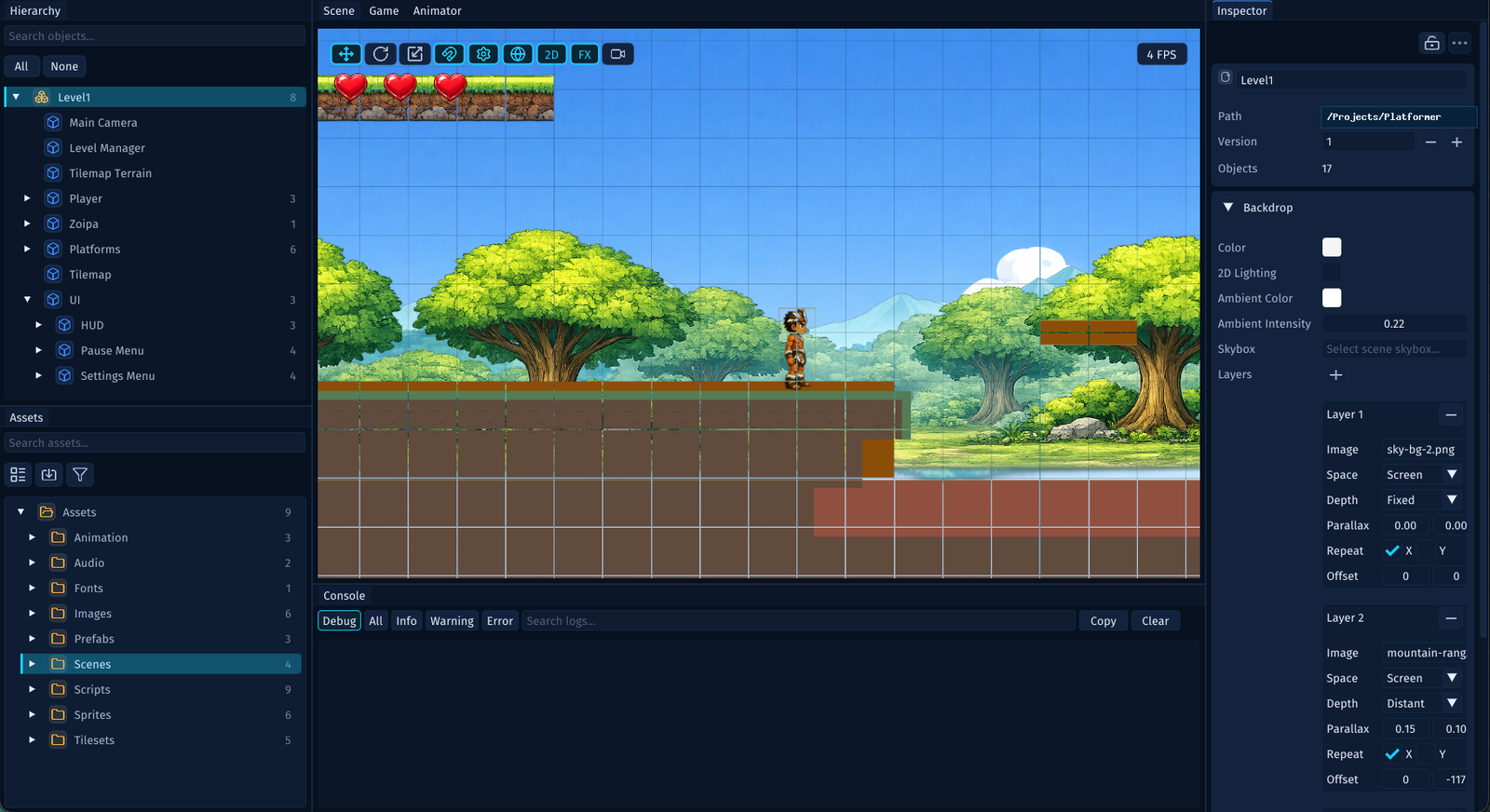
Edit Backdrops from the Scene Root
- select the scene root in the
Hierarchy - open the
Backdropcard in theInspector - choose a background
Color - click the add button in
Layersto add one or more layers - assign an image to each layer
- set
ParallaxandOffsetfor each layer
You can also toggle whether the backdrop is visible in the Scene view while you are editing.
What a Layer Controls
Each backdrop layer stores:
imagePathparallaxoffsetrepeat
Think of it like this:
imagePathchooses the imageparallaxdecides how much the layer moves with the cameraoffsetnudges the layer without moving the camerarepeatdecides whether the layer wraps on the X axis, Y axis, or both
Lower parallax values usually feel farther away. Higher values usually feel closer.
Example Layer Stack
{
  "backgroundColor": "#0F1B2D",
  "backgroundLayers": [
    {
      "imagePath": "Assets/Images/Sky.png",
      "parallax": { "x": 0.05, "y": 0.00 }
    },
    {
      "imagePath": "Assets/Images/Mountains.png",
      "parallax": { "x": 0.20, "y": 0.05 }
    },
    {
      "imagePath": "Assets/Images/Trees.png",
      "parallax": { "x": 0.45, "y": 0.10 },
      "offset": { "x": 24.0, "y": 0.0 }
    }
  ]
}
You normally author this through the editor, but it helps to understand the scene data shape.
Drive Backdrops from Scripts
You can also scroll backdrop layers from PHP code through Scene and BackdropLayer.
That is useful for:
- starfields in space shooters
- endless-runner sky or ground motion
- warp or boost effects that temporarily increase backdrop speed
Example:
use Lenga\Engine\Core\Time;
use Lenga\Engine\Core\Vector2;
use Lenga\Engine\SceneManagement\SceneManager;

$scene = SceneManager::getActiveScene();
$layer = $scene?->getBackdropLayer(0);

if ($layer !== null) {
    $layer->repeat = new Vector2(1.0, 0.0);
    $layer->translateOffset(new Vector2(30.0 * Time::deltaTime(), 0.0));
}
A Good Starting Recipe for 2D Parallax
If you want a quick layered background that already feels better than a flat image, try:
Sky layer        parallax x = 0.05
Mountains layer  parallax x = 0.20
Trees layer      parallax x = 0.45
Foreground haze  parallax x = 0.70
Keep the furthest layer subtle. The closer the layer feels, the more motion it can tolerate.
Where the Backdrop Appears
The backdrop appears consistently across the runtime and the editor.
That includes:
- the game when you press
Play - the
GameorPlayerpreview - the scene camera preview
- the
Sceneview, whenShow In Sceneis enabled
Tips for Better-Looking Results
- use broad shapes and simple silhouettes for the furthest layers
- reserve high-detail art for closer parallax layers
- let the background color support the image instead of fighting it
- keep the layer count modest at first, then add more only when they clearly improve depth