Use prefabs when you want to create the same kind of object more than once without rebuilding it by hand each time.
What a Prefab Stores
A prefab can store:
- a GameObject name
- a hierarchy of child objects
- Transform values
- components
- component field values
- asset references
That means a prefab can represent a complete authored object, such as a pickup, projectile, enemy, platform, UI panel, or player helper object.
Prefab Instances
When you place a prefab into a scene, the placed object is a prefab instance.
The Inspector can show the prefab source and whether the instance differs from the saved prefab. Use this to understand whether a scene object still matches the reusable asset it came from.
Prefab workflows help you:
- update common objects from one source
- keep repeated objects consistent
- make scene content faster to author
- reduce drift between copies
Save a Scene Object as a Prefab
When you have a GameObject set up the way you want, save it as a prefab so it can be reused.
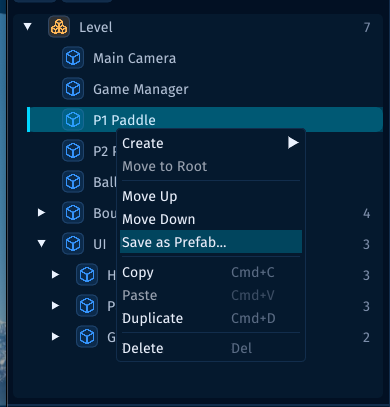
In the Hierarchy, right-click the GameObject and choose Save as Prefab....
Use this when an object already exists in the scene and you want to turn that authored setup into a reusable asset.
Create or Instantiate from the Assets Panel
Prefab assets live in the project like other assets.
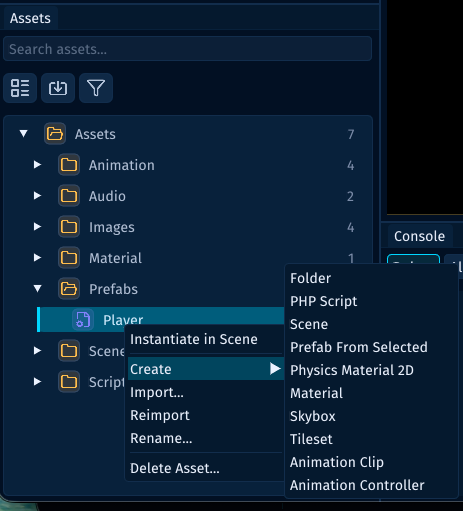
From the Assets panel, you can use prefab actions such as:
Instantiate in Sceneto place an existing prefab into the current scenePrefab From Selectedto create a prefab from the currently selected scene object
Use the Prefabs folder to keep reusable object assets easy to find.
Edit a Prefab Asset
Select a prefab asset in the Assets panel to inspect the saved GameObject setup directly.
The Inspector shows the prefab root as a GameObject with (Prefab Asset) in the header. You can adjust its name, active state, tag, layer, Transform, components, and script fields without first placing a temporary copy in the scene.
Use this when you want to tune the reusable source itself. Use a prefab instance in the scene when you want to tune one placed copy.
Assign Prefabs to Script Fields
Scripts can expose prefab-compatible references for objects or components that will be spawned later.
use Lenga\Engine\Core\Behaviour;
use Lenga\Engine\Core\GameObject;
use Lenga\Engine\Core\InstantiateOptions;
use Lenga\Engine\Core\ParticleSystem;

final class ProjectileLauncher extends Behaviour
{
    public ?GameObject $projectilePrefab = null;
    public ?ParticleSystem $hitSparkPrefab = null;
}
When a GameObject with that script is selected, drag a prefab asset onto a compatible field or use the field picker to choose from scene objects and prefab assets.
Prefab assignment follows the same rules as hierarchy assignment. A prefab can be assigned to a GameObject field directly. A prefab can also be assigned to a component field, such as ParticleSystem, when the prefab contains a matching component.
At runtime, pass the assigned prefab reference to GameObject::instantiate() when you want to create an instance. Component prefab fields can be instantiated directly; Lenga clones the prefab's owning GameObject and returns the matching component on the clone.
if ($this->hitSparkPrefab !== null) {
    $spark = GameObject::instantiate(
        $this->hitSparkPrefab,
        InstantiateOptions::at($hitPoint, name: 'Hit Spark'),
    );
    $spark->play();
}
Instantiate from Gameplay
Gameplay code can instantiate prefabs when it needs to create objects at runtime.
<?php

declare(strict_types=1);

namespace MyGame\Game\Scripts;

use Lenga\Engine\Core\Behaviour;
use Lenga\Engine\Core\InstantiateOptions;
use Lenga\Engine\Core\Prefab;

final class EnemySpawner extends Behaviour
{
    public function spawnEnemy(): void
    {
        $enemy = Prefab::instantiate(
            'Assets/Prefabs/Enemy.prefab.json',
            InstantiateOptions::at($this->transform->position, name: 'Enemy'),
        );
    }
}
Use prefabs for objects that should be authored once and reused many times.
Keep Prefabs Focused
A good prefab has a clear reason to exist.
For example:
Enemy.prefab.jsonProjectile.prefab.jsonCoin.prefab.jsonPauseMenu.prefab.jsonImpactFx.prefab.json
Avoid turning one prefab into a giant catch-all object. Smaller prefabs are easier to reuse, test, and replace.