Parent-child relationships help you group content, keep scenes readable, and move related pieces together.
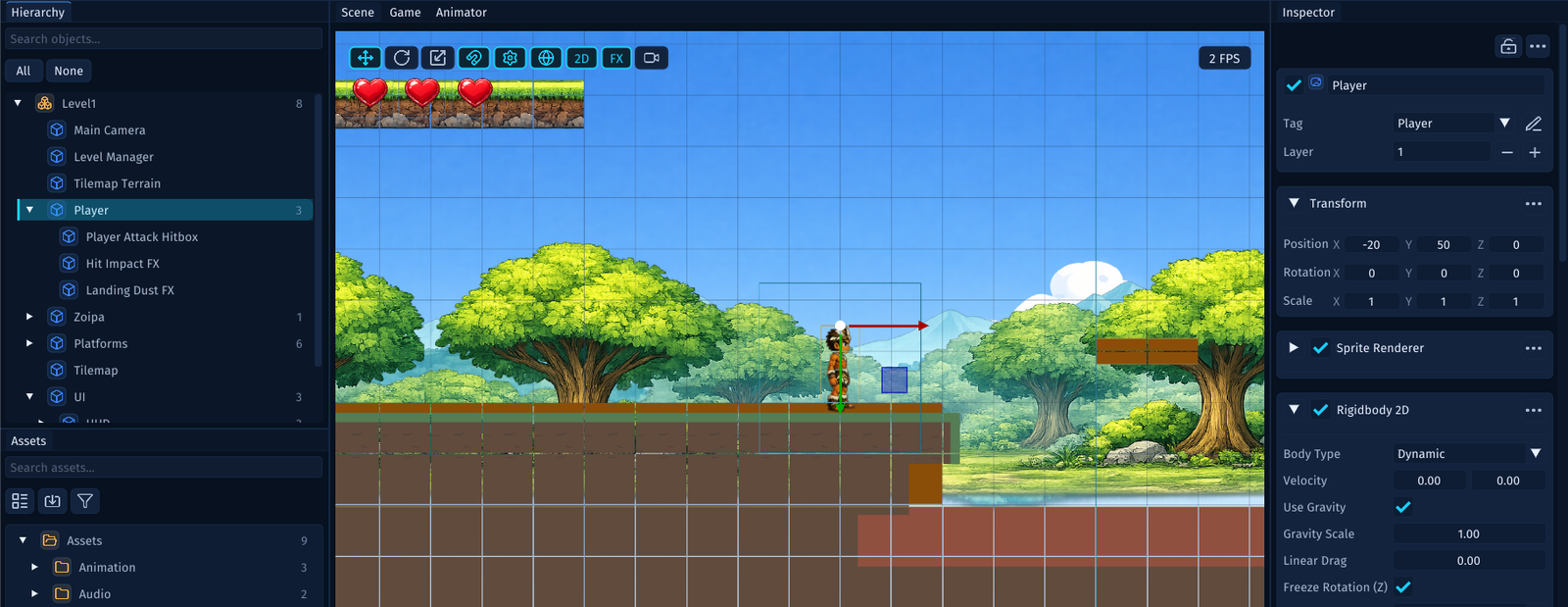
What Parenting Means
A parent object can contain child objects under it in the Hierarchy.
That relationship helps you organize the scene structure visually and logically.
In the screenshot, Player is the parent. Player Attack Hitbox, Hit Impact FX, and Landing Dust FX are children of that parent. Selecting Player in the Hierarchy also selects the player object in the Scene view and shows its components in the Inspector.
Examples:
- a
Playerobject with child markers or helper objects - a
Canvaswith child UI elements - an
Enemiesgroup containing several enemy objects - a
Levelroot containing environment groups
Why It Helps
A clean hierarchy makes it easier to:
- find objects quickly
- understand what belongs together
- select the thing you mean to edit
- collapse and expand groups while working
- move related content as one organized section
Use Grouping Intentionally
A good beginner rule is simple:
- group objects that belong together
- avoid deep nesting unless it clearly helps
If the hierarchy is hard to scan, it is harder to work confidently in the scene.
Parenting is not just for neatness. It is also a selection and editing tool. When related objects sit under the same parent, you can quickly tell which helper objects belong to the player, which objects belong to the UI, and which objects are part of the level itself.
A Practical Habit
When a scene starts growing, add parent objects for major sections such as:
- player
- enemies
- environment
- UI
- gameplay managers
That keeps the scene readable as more content arrives.