When you select a GameObject, each attached component appears as its own section. Open the section to edit the values that belong to that component.
Native Component Values
Native components expose values for their engine feature.
Examples:
- a renderer exposes visual settings
- a collider exposes size, offset, and trigger settings
- a rigidbody exposes body type, velocity, gravity, and collision behavior
- an audio component exposes clips and playback settings
- a camera exposes view and presentation settings
The component's job determines the fields you see.
Behaviour Field Values
Behaviours can expose fields too.
Use public properties and Inspector attributes when a designer should tune scene-attached gameplay logic without editing PHP.
<?php

declare(strict_types=1);

namespace MyGame\Game\Scripts;

use Lenga\Engine\Attributes\Header;
use Lenga\Engine\Attributes\Range;
use Lenga\Engine\Core\Behaviour;

final class PatrolSettings extends Behaviour
{
    #[Header('Movement')]
    #[Range(0.0, 20.0)]
    public float $speed = 4.0;

    #[Range(0.0, 10.0)]
    public float $pauseTime = 1.0;
}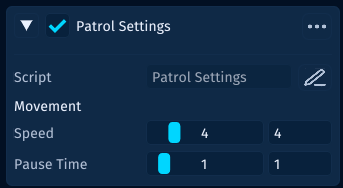
This is the editor doing its job: values that shape the game can be adjusted in the Inspector.
If a class only calculates values or organizes code, leave it as plain PHP. Inspector fields are for authored scene data, not every helper class in the project.
Component Actions
Component sections include controls for common authoring tasks.
Use them to keep the object tidy as the design changes:
- enable or disable a component
- reset values when a component needs a clean start
- remove components that no longer belong
- reorder components when the object is easier to read that way
If a component no longer explains the GameObject, remove it rather than leaving confusing old data behind.
Keep Inspector Data Intentional
Treat Inspector values as authored design data.
Good field names and clear ranges make a component easier for designers, future teammates, and future you to understand.