- Linear mixes colors based on light intensity. Use it as your starting point for natural lighting, glows, and transparent effects.
- Gamma mixes display values, like those shown in a color picker. This makes blends between dark and bright colors look darker. Try it if those darker transitions suit the look of your entire project.
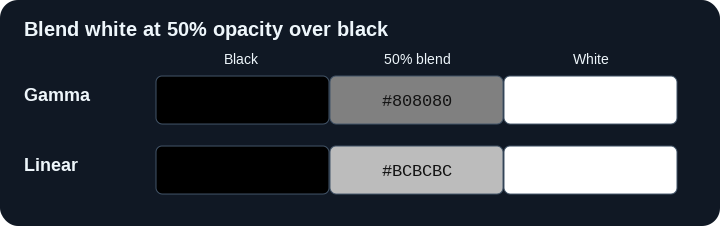
Compare the middle swatches. Both use the same 50% white and black inputs; the difference is how the colors mix. New projects use Linear.
To change it, see Choose the color space.
Which Scenes the Setting Reaches
The setting applies to every scene, 2D and 3D.
It affects the world even if post-processing is off. In Linear, translucent sprites and soft glows over dark backgrounds can look brighter, and semitransparent black shadows can look lighter than in Gamma. Screen-space HUD and menus blend the same way in both modes.
What Linear Changes
Lighting
In Linear, Lenga converts the colors of textures, materials, lights, and skyboxes before combining them. Normal, height, and occlusion maps describe surface data and are read without a color conversion.
Unlit Drawing
Opaque, unlit sprites and shapes keep their picked colors. The difference shows when they are translucent or when post-processing changes them.
Colors You Author in the Editor
Use the same color picker and texture files in either mode. Changing Color Space does not rewrite those assets.
Project Shaders
When writing a custom fragment shader, output display color from a
main function with a single vec4 output. Lenga converts that output
for Linear. If a shader looks too bright in Linear, see
Fix post-processing problems.
Post-Processing
Bloom and Lens Flare can look different in each mode. Start with the same Threshold and retune it by eye if you switch. Linear can keep highlights brighter than white on supported devices. Use Tonemapping if those highlights clip to white and you want to keep detail.
In the Editor
The Scene view, the Game view, the camera preview and the Inspector's material preview draw in the open project's Color Space. An applied change shows in them at once. A Play session that is running keeps the Color Space it started with.